

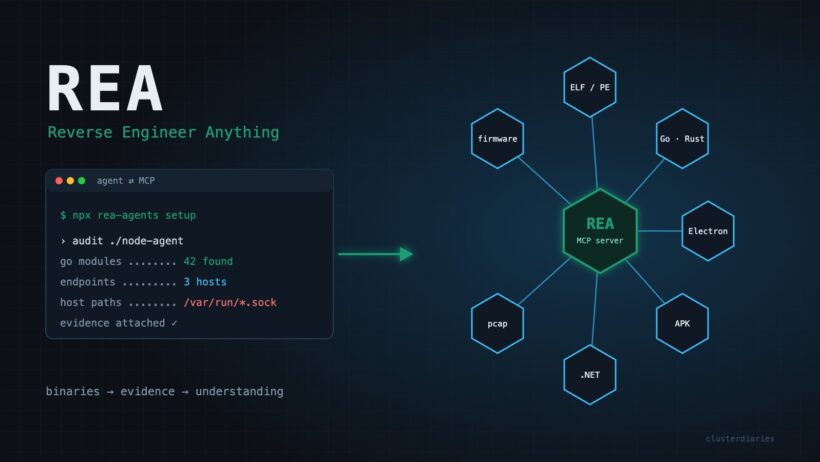

Every so often a GitHub repository changes what engineers think is possible in an afternoon. REA (Reverse Engineer Anything) by morluto is one of them. It has passed 300,000 stars, and the reason is simple: it gives your AI coding agent real reverse engineering tools, so you can ask “how does this app actually do that?” about software you don’t have the source code for, and get an answer backed by evidence.
This post gives a high-level overview of REA, explains why it is a genuine shift for engineers, and walks through one practical DevOps use case: vetting a closed-source vendor binary before it lands on your Kubernetes fleet.
What is REA?
REA describes itself as “one MCP for reverse engineering across binaries, applications, and runtime behavior.” In practice it is two things:
- An MCP server that plugs into AI agents such as Claude Code, Codex, Cursor, Gemini CLI and Grok Build.
- A CLI (
rea) that exposes the same workflows in your terminal, so you can script them.
The loop is straightforward. Your agent calls REA to inspect a target and trace the relevant code. REA returns findings together with the evidence and limitations behind each one. The agent then asks follow-up questions, explains the behaviour, or writes and tests an implementation. Analysis runs locally on your machine.
Getting started
# Register REA with your agent(s) – review and approve the proposed changes
npx rea-agents setup

# Or install the CLI for regular use
npm install --global rea-agents
rea --help

# Example: statically inspect an extracted JavaScript/Electron app
npx -y rea-agents@latest analyze-javascript-application /absolute/path/to/app --json
REA needs Node.js 22.19+, 24.11+ or 26+. Native binary analysis uses an existing Hopper, Ghidra or IDA installation (setup can optionally install Hopper with your approval), while static JavaScript and .NET analysis need no native engine. Keep it current with rea update; the project ships fixes frequently.
What it can analyse
The breadth is what stands out. A single MCP server covers:
- Native binaries – pseudocode, assembly, strings, symbols, calls and references via Hopper, Ghidra or IDA.
- Go and Rust binaries – embedded compiler versions, modules and dependency graphs, with no Go or Rust toolchain required.
- JavaScript and Electron apps – modules, imports, source maps, routes, IPC and native add-ons.
- .NET assemblies, Android APKs and devices, Flutter apps – metadata, decompiled methods, manifests and build provenance.
- Websites and network captures – page structure, scripts, network observations, HAR files and pcaps (endpoints, DNS, TLS SNI).
- Firmware, WASM, EVM bytecode, SQLite databases and AI model files (GGUF/safetensors metadata).
- Process behaviour – terminal output, interactions, exit status and filesystem observations on Linux and macOS.
- Recorded Linux crashes – registers and signals for every recorded thread.
Why REA is a game changer
1. Reverse engineering becomes a conversation
Tools like Ghidra and IDA have always been powerful and always had a steep learning curve. REA puts an agent in front of them. Instead of learning a decompiler UI, you ask a question in plain English, such as “Understand how search works in the Notes app, show me the evidence, and build a similar feature for my project,” and the agent drives the tooling.
2. Evidence, not hallucination
The biggest risk with AI explanations of code is confident guessing. REA’s results carry the evidence and limitations behind each conclusion, so you can check the instructions, symbols or IPC calls yourself. The showcases make the point: a DX-Ball sound-pan reconstruction passes 3,205 original x86 test cases and reproduces all 63 compiled function bytes.
3. One interface for every artefact
Platform engineers deal with a zoo of formats: container images full of Go binaries, Electron desktop tools, Android apps, firmware on edge devices and packet captures from incidents. REA gives the agent one consistent interface across all of them, rather than a separate tool and mental model for each.
4. Local-first and agent-agnostic
Analysis runs on your machine, and REA works with whichever agent your team already uses. One caveat: your agent’s model provider still sees whatever the agent sends it, under that provider’s data policy, so choose your model accordingly for sensitive targets.
5. Scriptable
Because the CLI exposes the same workflows with JSON output, REA isn’t just an interactive toy. It can become a step in a pipeline.
DevOps use case: vetting a closed-source vendor agent before it reaches your cluster
Here is a situation most platform teams know. A vendor ships a monitoring or security agent as a container image, to run as a privileged DaemonSet on every node. You get a Helm chart and a binary, but no source code. Security wants to know what it talks to, what it touches on the host, and whether it carries vulnerable dependencies. Usually the honest answer is “we trust the vendor.”
REA lets you replace trust with evidence.
Step 1 – extract the binary
docker pull vendor/node-agent:4.2.1
cid=$(docker create vendor/node-agent:4.2.1)
docker cp "$cid":/usr/bin/node-agent ./audit/node-agent
docker rm "$cid"
Step 2 – ask your agent to investigate with REA
Using REA, audit ./audit/node-agent before we deploy it as a privileged DaemonSet.
Show evidence for every finding and state its limitations.

1. Identify the language/toolchain. If it is Go or Rust, list the embedded
   compiler version and every module/crate with its version.
2. List hard-coded hostnames, URLs, IPs and ports found in strings and references.
3. Find code paths that read or write host paths (/proc, /var/run, /etc,
   container runtime sockets) or execute other binaries.
4. Summarise anything that looks like remote command execution or self-update.
For a Go binary, REA reads the embedded module list directly, with no source and no Go toolchain needed. That list is effectively a dependency inventory you can feed into your existing vulnerability scanner, such as osv-scanner or Grype.
Step 3 – observe runtime behaviour in a sandbox
Static analysis shows intent; runtime shows reality. In an isolated Linux VM, use REA’s process capture to record the agent’s filesystem observations and exit behaviour, and capture its traffic with tcpdump. REA’s packet summaries then return the endpoints, DNS lookups and TLS SNI names it actually used.
Step 4 – turn findings into guardrails
The output of the audit becomes platform configuration, not just a document:
- Egress allowlist – a NetworkPolicy (or Cilium policy with FQDN rules) that allows only the endpoints you observed.
- Least privilege – drop capabilities and hostPath mounts the binary never touches.
- Dependency gate – fail the rollout if the extracted module list has critical CVEs.
- Drift detection – rerun the same audit on every vendor release and diff the results. A new endpoint or a new exec path is a review trigger.
That last point is where REA shines for DevOps. Because the CLI is scriptable, the audit can run as a CI job on each new vendor image tag, giving you an evidence-backed change report before anything is promoted to production.
Responsible use
REA’s own disclaimer is clear: it is for lawful research, education, interoperability, software preservation, and analysis of software you own or are authorised to examine. Check your vendor contract before reverse engineering a commercial product, and get commercial tools such as IDA Pro, Hopper or JEB through proper licences. Install only from the official sources: the morluto/rea repository, rea.tools or the rea-agents npm package, because look-alike repositories exist.
FAQ
Which AI agents work with REA?
Claude Code, Codex, Cursor, Gemini CLI, Grok Build and other MCP-capable agents. npx rea-agents setup registers the MCP server and installs matching workflow instructions.
Do I need Ghidra, Hopper or IDA?
Only for native binary analysis. Static JavaScript/Electron and .NET inspection, plus Go and Rust metadata extraction, work without a native engine.
Does REA upload my binaries?
Analysis runs locally. Your agent’s model provider still receives whatever the agent sends it, under that provider’s data policy.
Takeaway
REA turns reverse engineering from a specialist craft into something any senior engineer can do with an agent and a good question. For platform teams, the most immediate win isn’t copying features from other apps. It’s finally being able to answer “what does this black box in my cluster actually do?” with evidence. Explore more in our AI and Security sections.